Arc 3 Communications

  • Home
  • About Us
    • Our Founder
    • Our Approach
    • Our Values
  • Services
    • Content
    • Digital
    • Advocacy
  • Our Work
    • Content
    • Digital
    • Advocacy
  • Blog
    • Archive Page
  • Contact Us

How to Safely and Securely Use Zoom for Government Meetings

July 14, 2020 By Patrick L. Burns Leave a Comment

The video-conferencing app, Zoom, has become a daily tool for many people during the COVID-19 pandemic. As cities and state across the country were shutting down to protect against the spread of the virus; state and local governments were trying to find ways in which they could move forward with important meetings while being unable to meet in person.

Zoom became a go-to due to its ease of use; ability to have up to 100 people attend a meeting; and free use for up to 40 minutes. A problem that arose was what became known as “Zoom bombing” where a person or persons gains access to the Zoom meeting by hacking or obtaining the Zoom chat information and causes disruptions to the meeting.

One example of this was during a Kansas City Council committee meeting when a hacker or hackers infiltrated the meeting and began cursing and using racial slurs until the committee was forced to shut down the meeting. Another occurrence was during a Maine’s Children’s Behavioral Health Townhall in which a hacker or hackers gained access and began displaying deeply disturbing and offensive images forcing the meeting to be shutdown.

In addition to Zoom bombings, there have been instances of camera and audio high jacking, in which hackers can take control of a user’s camera or audio device to bug a meeting or even install harmful spyware and malware onto a user’s device.

Instances like these have caused many governments to rethink whether they want to use the platform to conduct meetings. Luckily, there are steps you can take to ensure your government Zoom meeting is protected against these unwanted Zoom bombings. Below we provide a how-to on securing you state and local government Zoom meetings.

  1. Always Password Protect Your Meetings

The easiest way to prevent unwanted intrusion into your government meetings is simple and easy to do; set a password. You have the option to set the password at the individual meeting, user, group, or account level and it is suggested to use a different password for each meeting. In order to do this, log into your Zoom portal and go to the “settings” tab. From there enable “require a password when scheduling new meetings” and Zoom will generate a password each time a meeting is scheduled.

  1. Use a Randomly Generated Meeting ID

When creating a Zoom account, you are provided with your own personal meeting ID you can use to set up meetings. These are not ideal for use for government meetings; especially if planning on public input attendance. It is suggested you do not make your personal meeting ID public. Once someone has your personal meeting ID it can either be leaked or used to gain access to future meetings; instead it is suggested you use a randomly generated meeting id. You can select this option when setting up your meeting.

  1. Utilize the Waiting Room Feature

The waiting room is normally used for individual interviews or one-on-one sessions, it can be utilized to screen participants as they join before allowing them to come into a meeting. This gives the host greater control over session security and prevents anyone who may have obtained the login information dishonestly from joining.

  1. Disable Participant Screen Sharing, Mute Upon Entry

In order to avoid people showing inappropriate things such as happened in the aforementioned examples, disabling attendant’s ability to use screen share can help prevent that. Unless someone is scheduled to share a presentation or visual, going under the “security” tab during your active session and disabling screen share can help avoid unwanted disturbances. Also remember, as a host, you can choose to mute people upon entry or manually mute or unmute a participant during the meeting.

  1. Lock the Meeting Once it Begins

Once the time for the meeting has arrived and everyone is in attendance who is meant to be there, it is a good idea to “lock” your meeting to prevent others from joining. This can be done once the session has begun by going to the “Manage Participants” tab and clicking on “more.” From there you can click on “lock” and this will prevent anyone else from joining the meeting. It can be unlocked at any time if you need to admit anyone.

  1. Evict Troublesome Participants and Report

If someone happens to come into your meeting uninvited or a participant begins causing trouble, you, as the host, can remove that person from the meeting. This should be done immediately upon noticing an issue. All you have to do is mouse over the participant’s name and with the option pop-up chose the “remove” option. After you have done this you can report them to Zoom’s Trust and Safety team who will take appropriate action.

  1. Keep Your Zoom App Updated

As security and functionality issues arise, patches and updates are regularly released to combat these issues. Each time before using Zoom, you should always check to make sure you are updated to the latest version. This can be done by opening your application, going to your profile and selecting “Check for Updates.” The app will automatically scan and install any updates.

Using Zoom for government meetings is a good way to continue with important policy and public engagement processes during these trying times. Zoom is an ever-evolving platform that continues to take steps towards a more secure meeting experience. Making sure you take all precautions to secure your meetings will help prevent bad actors from gaining access and wreaking havoc. Government meetings are essential to keep state, cities, and counties running smoothly, and Zoom is one means to keep the wheel turning until we can all safely meet in person again.

Filed Under: Government, Public Affairs Tagged With: Advocacy, Arc 3 Communications, Digital and Government, Digital and Public Affairs, Gov 2.0, Government, public affairs, ZOOM

How to Make an Impact With Your Elected Officials During COVID-19

April 23, 2020 By Patrick L. Burns Leave a Comment

Advocating for your business or association and being able to get your message across to your elected officials during the COVID-19 pandemic crisis can be intimidating. Elected officials are literally in the middle of making life saving decisions between public health and economic livelihoods. While the majority of us are sheltering in place and social distancing, there are still many ways in which you can be heard by your elected officials at the local, state and federal levels; and your input is now more important than ever. They were elected to represent and serve you, and they can best do that through your effective advocacy. Below are ways in which you can connect with your elected officials and communicate your message in a way that is clear and makes a lasting impression during this crisis.

Email Your Lawmaker 

One of the easiest ways to get in touch with your elected officials is by email. You can usually find elected officials’ emails on your local government’s website or sites such as Open Secrets  or your Secretary of State’s website. When writing an email to an elected official, there are many things to keep in mind to make sure your email is effective and well received. Below are some tips on successfully emailing your representatives:

  1. Put your name and address at the top of your message.
  2. Humanize your message.
  3. Be brief.
  4. Be clear about your position.
  5. Make your message timely.
  6. It is okay to disagree, but don’t be abusive or threaten.
  7. Avoid attachments.
  8. Don’t spam elected officials or their office.
  9. Be honest.
  10. Proofread your email.

These 10 rules are key to writing an effective email that will likely be read and resonate with your officials. They hold true anytime, but especially during the time crunch of a crisis.

Schedule a Virtual Visit with Your Elected Official

During normal times, an in-person visit is the best way to connect with your elected official and to leave a lasting impression. While this is close to impossible during the COVID-19 restrictions, local officials and state and federal lawmakers are making themselves available via virtual platforms for meetings with constituents. Schedule a virtual meeting on a platform such as Zoom, Skype or Google Hangout much like you would an in-person meeting. Lawmakers may have their virtual platform preference or may defer to yours. This is a good way to discuss the concerns and needs of your association, business or industry that are important to you during this critical time.  Virtual visits with elected officials must be scheduled with staff, and you must exercise patience, and understand that these officials’ schedules are extremely busy. Also, be respectful of their time when you do get a meeting, try to limit your meeting to 10-30 minutes. After your meeting, be sure to express your gratitude for the time taken to meet with you and let your elected official know you truly appreciate their time and the opportunity to meet with them. A virtual meeting is a great way to stand out among the many emails and letters these officials receive every day.

Prior to your meeting, make sure you have a plan or strategy for what you want to say and how you want to present your information and request. You want to be prepared for any questions or follow-ups that may come from your presentation. Make sure you are knowledgeable and informed on the topic you will be discussing in order to establish credibility and even bring some leave behind materials with printed information such as flyers, petitions, or fact sheets that can be shared via the screenshare or the chat function of the virtual platform. Be sure to also ask your representative’s stance on the issues at hand and their thoughts and ideas; this will help by letting them get involved with the conversation and may shed light on certain aspects of the issue you had not thought of.  Be sure to make your ask and wait for an answer; if the elected official’s response is undecided, ask when you may be able to follow up with the official or legislator and their staff for an answer. After your meeting, follow up as you would with an in-person meeting; write a follow up thank you letter and email to the elected official and their staff.

Call Your Legislator

If your time is limited, or it is important for you to get in contact immediately, calling elected officials may be your best option. A phone call could make the difference in the issue or help make progress and move things forward. When you call, remember to be professional, remain courteous and factual. Make sure you establish yourself as a constituent and a voter; this will make your elected official much more receptive. Much like in person or virtual meetings, make sure you plan and strategize your call before making it so you can stay on your message. Also, like with any other contact you may have with an elected official, thank them for their time and for hearing you out. 

Whichever communication channel you decide to use, make sure you always give your name, address, and telephone number and your relevancy to the elected officials district or area they represent to drive home the fact you are a constituent and voter. Always remain confident and professional when you are presenting where you stand on an issue especially during this time of crisis.  Do not be reluctant to contact your elected officials during this time; they are there to represent you and hear where you stand on issues that are important to you, your association, business or industry during the COVID-19 pandemic.  Your email, virtual meeting, or phone call could be the one to make the difference you’d like to see for your association, business or industry.

For more information or for help with your COVID 19 advocacy and government relations efforts visit our website at www.arc3communications.com or contact Patrick Burns at pburns@arc3communications.com or 678-907-2478.

Filed Under: Business Advocacy, Government, Public Affairs Tagged With: Advocacy, COVID 19 advocacy, COVID 19 elected officials, COVID 19 government relations, COVID 19 public affairs, COVID-19, Elected Officials, government relations, public affairs

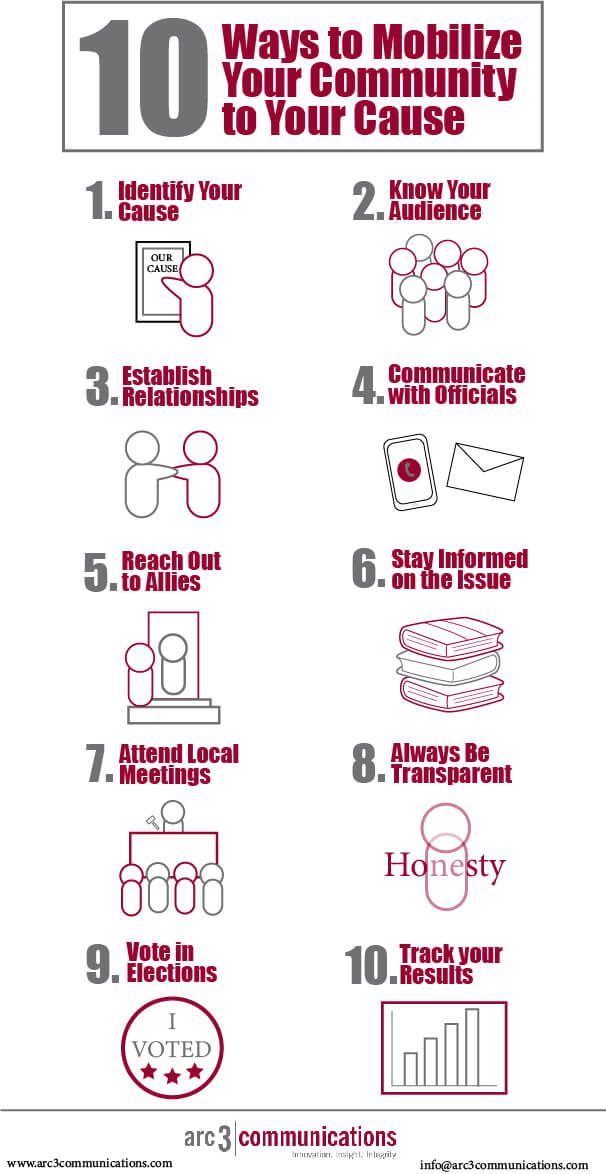
10 Ways to Mobilize Your Community to Your Cause Infographic

January 10, 2020 By Patrick L. Burns Leave a Comment

When it comes to making a change in your district, the most powerful tool you have is your community. The ways in which you can mobilize your community has evolved with the introduction of the internet and social media, but many of the traditional methods still remain useful.

Filed Under: Government, Public Affairs Tagged With: Advocacy, public affairs

How to Tell the Difference Between Real and Fake News Online

November 18, 2019 By Patrick L. Burns Leave a Comment

In this day and age of information at our fingertips, 24/7  updates, and social media, it is easy to get overwhelmed and loose track of what news is coming from where. This is when people begin to react with their emotions over their logic. Someone may see a headline that sparks a reaction in them, and they immediately share it on social media. Many times, they will not even read the article or check the source, they simply see a headline, react, and share. This often results in the spread of fake news, and many of these false stories even end up going viral.

Fake news is nothing new, it has always been around to mislead or sway people towards a certain belief or action. The difference is now, with the internet and social media, fake news can be spread quickly and reach millions in minutes. There are many reasons why people share fake news stories, and they aren’t always bad intentions. Many people will see a story that supports their views, opinions, or beliefs and without looking too much into it, will share it.

With most of the world getting their news online and through social media, fake news is never hard to come across. It comes in many forms; but will always have an eye-catching headline that tells a story without the reader needing to read the rest of the article. Even if a reader does decide to read the article, these stories are made to seem credible and true. They may even take a story that is real news and change important details to spin the story to the desired view.

This is why readers need to take time and do a little research to verify the news they are reading and sharing with others is, in fact, real news from a credible source. Below are a few steps you can take to make sure the information you are receiving and sending is reliable and true.

  1. Be sure your news is coming from a credible source.

Pay close attention to the source your story or information is coming from. Is this a credible source? One way to determine this is to look at the author of the piece. Many fake news stories tend to have “staff” or even no author listed. Once you find the author, do a quick search on that author and see what else they have published and if there are any complaints about them producing fake news.

Another big indicator is the domain name, as many websites have been made to mimic true news sources. Watch out for anything with a “.com.co” at the end of the URL, this can be done with well-known news source names to trick readers. A quick web search of the domain name can give you more insight into whether the site is a credible source for news.

One more thing you can do to determine a websites credibility is to check the rest of the website. Do they have sources cited on their stories? Do they have legitimate contact information? Are they well-known or lesser known? Have they covered well-known news stories or do all of their stories appear in a clickbait fashion? These determinates can help you discover whether the site you are reading news from is credible and dependable for future news.

  1. Read more than just the headline and sub-headline.

A big problem with the spread of fake news is that so many people will see a catchy or controversial headline and immediately share out of an emotional reaction. Others will click the link and maybe scan the article quickly, decide it appeals to their views, and share it without ever checking for credibility. This is where a major problem lies and how false stories get spread so quickly by so many.

Take time to go to the story and read through it carefully, maybe even more than once. Check the credibility of the author and website as laid out in the first step. Sometimes you may find the story behind the headline is something completely different from what it was made to sound like. Other red flags may be bad grammar or misspellings throughout the story, this could point to a fake story as credible pieces are proofed quite thoroughly. Check to see if any facts or quotes shared in the story are cited at the end of the article, and if so, are those sources credible as well. This may sound like a lot of work, but it will help to protect your character and credibility as well as make sure you are getting reliable and correct information.

  1. Is the information being reported by multiple sources?

When you find a news story of interest, check and see if it is being reported on by multiple news sources. Usually, if a story is true and timely, it will be covered by more than one news source. It is very rare that a story that is capable of making the news will only be reported by one publication. If it is a national or international story, check with trusted major news organizations to see if they have any mention or information on the story. If you are reading a local story, check with other local publications or get in contact with your local publication and see if they have heard anything about the story in question.

In addition to this, make sure the story you are looking at is timely. Sometimes an old  story will begin to circulate attempting to pass as a new story. There may also be an attempt to falsify this information, which is why it is always good to cross examine with other news sources.

  1. Check Your Story with a Fact Checking Website.

With so much information available the internet, it is not always possible to do in depth research for every story you come across. If there is a viral story you come across, there are fact checking websites that do this research for you. Websites such as www.snopes.com take viral news stories and let you know whether they are real or fake, and if they are real, if the facts presented in the story are accurate. There are many websites like this online, so it also wise to make sure you are using one that is credible and non-biased to get accurate information.

There are fact checking websites run by non-profits, educational centers, and libraries. These are usually the most reliable ones to gather information from.

In Conclusion

When gathering your news from social media and online sources, your critical thinking and attention to detail will go far in detecting fake news. Often fake news stories are made to drive emotional responses and are written in such a way to do just that. Practice taking the time to check sources, research the story, and use fact checking sites to weed out the fake news from the real news. With time, you will begin to see a trend in how fake news presents itself and will be well equipped to avoid it. By following these simple steps, you can help prevent the spread of fake news and misinformation and help your credibility in the process. In a time of unlimited information, make sure the news you are getting is credible and dependable.


Filed Under: Campaigns and Elections, Government, News, Public Affairs Tagged With: Campaigns and Elections, Fake News, How To, News, social media, Social Media and Politics

Happy Anniversary Arc 3 Communications!

October 30, 2017 By Patrick L. Burns Leave a Comment

Happy Anniversary Arc 3 Communications Arc 3 Communications Celebrates Its Sixth Year in Business!

Happy Anniversary Arc 3 Communications! As we celebrate the 6th year of our agency, I wanted to stop and reflect on those things that I’m grateful for as its founder. My entrepreneurial journey has been an amazing ride of ups and downs, but I have so many things to be grateful for. Here are some of those things that I’m most thankful for:

1. I am grateful for our clients in the public affairs space that have entrusted us over the years to help with their content, digital and analytics needs. We have worked with clients ranging from government agencies to trade associations to political campaigns at the local, state and national levels. We have developed new websites, social media campaigns and all types of amazing content to help them accomplish their legislative, policy, electoral and civic engagement goals.

2.  I am grateful for the talented team of designers, developers, social media, technical and public affairs experts at Arc 3. I am also thankful for our interns that breathe life into our agency with their new ideas and energy. Our current interns from Kennesaw State University, Paul McNally and Kirbe Bostick are doing an awesome job for us.

3.  I am grateful to our trusted partners in helping us to carry out our mission. These knowledgeable experts in accounting, law, finance, human resources and technology are invaluable.

4. I am grateful to the great team at Ignite HQ who provide us with an affordable and innovative office space to work in that is filled with other startups. The shared learning from other entrepreneurs has been immeasurable. I’m especially grateful that its located off of historic Marietta Square and close to home.

5. I am grateful to the many innovators in digital, social media and technology that have transformed media and marketing to a world driven by content and sharing. This includes not only the creators of well-known platforms such as WordPress, Facebook, Twitter, YouTube and LinkedIn; but the countless other innovators who developed lesser known platforms that have helped to create a competitive marketplace that produces amazing channels for communication and sharing. Most noteworthy of late are those who have made website hosting extraordinarily better such as Flywheel.

6. I am grateful to our agency competitors, who by their efforts in the marketplace, push us to do better and strive to be our best.

7. I am grateful for the digital, social media, creative and tech start-up community of Atlanta in which we are constantly learning new tools and tactics through shared knowledge and learning. I am most grateful to the WordPress community.

8. As Founder of an agency focused on the civic space, I am grateful for the many long-standing institutions in government, politics and civic life and the people and ideas that sustain them. While its been under siege by a time of technological transformation, the great civic life of our country depends upon engaged citizens, media, candidates, elected officials, association executives and government public servants at all levels.

9. I am grateful for mentors, friends and colleagues throughout my career in government, politics, academia and the agency world who have offered sound advice and encouragement. Many have also referred business our way and I’m thankful.

10. I am most grateful to my family for their constant love, patience, prayers and support throughout my entrepreneurial journey. My wife Mary and our four children have shared this experience with me every step of the way. Mary has been a sounding board, critic, and cheerleader. Her kindness, patience and love has been the rock upon which my successful agency has been built.

Most of all, I am grateful to God for these last six years and the opportunity to embark on my entrepreneurial journey. Without his love and my faith in him, nothing is possible.

Filed Under: Campaigns and Elections, Content Marketing, Digital Marketing, Government, Public Affairs, Social Media Marketing, Website Development Tagged With: Arc 3 Communications, Arc 3 Communications and Anniversary, Arc 3 Communications and Patrick Burns, Arc 3 Communications and Sixth Anniversary, Arc 3 Communications Founder Patrick Burns, Arc 3 Communications Things Grateful For, Facebook, LinkedIn, Social Media Marketing, Twitter, Website Development, WordPress

Website Development Case Study: Georgia Secretary of State

October 6, 2017 By Patrick L. Burns Leave a Comment

Georgia Secretary of StateProject Goals

For several years, the Georgia Secretary of State  conducted the Peanut Poll, a straw poll held every year at the Georgia National Fair in Perry. Each year, the straw poll focused on participant’s choices for federal elected office such as President and U.S. Senate. One of the most successful straw polls in the country, the poll was a part of the Georgia Secretary of State’s mission to raise awareness about elections and encourage voter registration.

However, in 2017 with no major election pending, the Secretary of State’s office sought to re-brand the Peanut Poll to be a contest to have Georgians pick the best high school football team in the state. In addition to a re-branding to reflect the change in direction of the poll, the Secretary of State sought to develop a new website and online polling system that would allow Georgians to vote for one of the 460 high school football teams online and on tablets at the Georgia Grown booth at the fair.  After voting, participants would be directed to the Secretary of State’s online voter registration page to check their registration status and register to vote if they had not already. The new “Gridiron Showdown” Peanut Poll sought to engage high school students who were now eligible to register to vote, but had not yet done so.

Our Solution

With the Georgia National Fair coming up quickly, the Arc 3 Communications team worked expeditiously with the Secretary of State’s Outreach Staff to create a new and unique brand for the Gridiron Showdown Peanut Poll. A new mobile first website was developed that incorporated a polling system that allowed for visitors to quickly vote for one of Georgia’s 460 high school football teams. Upon voting, Georgians were directed to the Secretary of State’s online voter registration page. At the Georgia National Fair’s Georgia Grown Booth visitors were presented with i-pads upon which they could visit the website and vote for their favorite team while voters from across the state also submitted their ballots on the website. The website polling system calculated and displayed the results in real-time as they happened. Each day at 5 p.m, a special guest would announce the results at the Georgia Grown Booth at the Fair. Voting results announced on the website were easily able to be shared on social networks.

Results

The new Peanut Poll brand incorporating a football referee raised awareness about the new nature of the poll and athletic directors from across the Georgia High School Association were excited about the poll and encouraged students, athletes and parents to participate. The Georgia National Fair also publicized the straw poll and the opportunity to vote at the Georgia Grown booth.

By the time of kickoff and voting began, media outlets around the state had already started talking about the Gridiron Showdown Peanut Poll and social media was buzzing. After ten days, over hundreds of thousands of votes had been cast making the Peanut Poll one of the most successful straw polls and voter registration efforts in the country. The Peanut Poll was embraced not only by high school communities in and around the Georgia National Fair in middle Georgia, but by 460 school communities from across the entire state. Participants from all walks of life participated in the Peanut Poll, including some celebrity voters such as U.S. Secretary of Agriculture Sonny Perdue who visited the Georgia Grown Booth and cast his vote for his favorite team. Special guests who announced the daily results included Georgia Agriculture Commissioner Gary Black who also cast the first vote at the fair online.

In the end, the new Peanut Poll was a success in its ultimate goal of encouraging folks to register to vote. The Georgia Secretary of State’s online voter registration page saw not only a surge in visitors, but also an increase in voter registrations. Because of the 2017 Gridiron Showdown Peanut Poll, new voters will cast their ballots in the 2018 Elections for the first time. These new voters will cast their ballots for something more important than their favorite football team; they will have the opportunity to vote for who will serve them in public office at the local, state and federal levels.

Filed Under: Campaigns and Elections, Government, Website Development Tagged With: Gary Black, Georgia Grown, Georgia High School Football, Georgia National Fair, Georgia National Fair and Peanut Poll, Georgia Secretary of State, Georgia Secretary of State Brian Kemp, Georgia Secretary of State Peanut Poll, Georgia Secretary of State Voter Registration, Peanut Poll, Sonny Perdue

This Week in Digital & Public Affairs: Facebook Video Ads and Data Driven Campaigns

February 20, 2017 By Patrick L. Burns Leave a Comment

Below is a roundup of key stories in digital and public affairs for this week:

Content, Digital and Social Media

In an effort to give advertisers more control over their video ad buys, Facebook is allowing the media industry’s independent measurement monitor, Media Rating Council (MRC) to audit the measurements it provides advertisers. Facebook will sell video ads based on the MRC’s viewability standard, allow more granularity in performance measurement and introduce an option for paying for ads only when users watch the video with the sound on.

With the release of Chrome 56, Google has started tagging http payment and login pages as “not secure”. HTTP Pages that collect login details or credit card numbers will be marked as non-secure pages, and the warning will eventually be used for all http pages. With over 1 billion users of Chrome, Google’s efforts will pressure website operators to at least consider enabling site-wide HTTPS.

Gov 2.0 and Public Affairs

On Hootsuite’s blog, Jylian Russell offers the benefits that social media in government can achieve such as its role in raising awareness, citizen engagement and crisis communications. Russell also weighs some of the challenges of using social media in government and offers some solutions for mitigating those risks.

CNN reports on the decision by the White House to expand its social media team with several new hires to assist current White House social media director Dan Scavino. Since the Inaguration, President Trump and Scavino have primarily handled social media communications, posting on President Trump’s personal and official White House social media accounts on Twitter and Facebook.

In Associations Now, social media journalist Ernie Smith offers suggestions to associations for improving their email marketing in 2017. Smith recommends new tools for consideration for sending emails on the cheap, making design less painful, and acquiring better data.

Campaigns and Elections

In Politico Magazine, Democratic direct mail consultant Dave Gold laments how data driven campaigns by Democrats have resulted in 4 straight election cycle losses for his party. Gold argues that Democrats should pay less attention to quantitative political science and focus more on creating message driven campaigns that utilize storytelling that connects with voters’ emotions.

These are some of the reads that matter to us for the week in digital and public affairs. Want to get in depth analysis, news, and how to tips in digital and public affairs? Subscribe to our monthly newsletter here.

Filed Under: Business Advocacy, Campaigns and Elections, Content Marketing, Government, Public Affairs, Social Media Marketing Tagged With: Data Driven Campaigns and Election 2016, Election 2016 and Data, Email Marketing and Trade Associations, Facebook, Facebook and Video Ads, Facebook Video Ad Metrics, Google Chrome 56, Google Chrome 56 and HTTP, Google Chrome 56 and HTTPS, President Trump and Social Media, Social Media and Government, Social Media and Government and Hootsuite, White House and Social Media, White House Social Media Team

This Week in Digital and Public Affairs – Cyborgs and a Congressional Digital Service

February 13, 2017 By Patrick L. Burns Leave a Comment


Below is a roundup of key stories in digital and public affairs for this week:

Content, Digital and Social Media

Facebook and Google announced that they would be joining forces with eight French news organizations to launch fact checking tools to root out fake news in France ahead of the country’s presidential election.  Facebook is also taking steps against fake news in Germany, where government officials have expressed concerns that false stories could influence a federal election in September.

The Washington Post reports on the growing popularity  of a variation of  Twitter “bots” called “cyborgs”. Cyborgs mix human creativity and initiative with a computer’s speed, allowing their views to gain audience while sidestepping the traditional gatekeepers of news and commentary. For example, one conservative twitter cyborg user tweets more than 1,000 times a day using “schedulers” that work through stacks of his own pre-written posts in repetitive loops. With retweets and other forms of sharing, these posts reach the feeds of millions of other accounts. One research team at Elon University in North Carolina found that “highly automated accounts” supporting President Trump — a category that includes both bots and cyborgs — out-tweeted those supporting Democrat Hillary Clinton by a ratio of 5 to 1 in the final days before the Election 2016 vote.

Gov 2.0 and Public Affairs

Wired reports that while the prevalence of apps like Countable and Democracy.io make it easier than ever to send electronic communication to members of Congress, not much has changed in how Congressional staff respond to these messages. Despite the dramatic increase in email communication by constituents over the years, research by Zogby found that a third of people who email Congress receive no response, and nearly half of those who did receive a response found it lacking, usually because they believed it failed to actually address their issue. According to Seamus Kraft of the OpenGov Foundation, software used by staffers to respond to email messages remains antiquated. To solve the software and technology problem, the OpenGov Foundation has proposed a “Congressional Digital Service” not unlike the White House’s United States Digital Service (USDS), which works to modernize government agency websites and technology.

Associations Now reports on how the Internet Movie Database (IMDb) service (now owned by Amazon) has decided to end its online message boards due to trolls and the consistent negative tenor of comments provided to the site. Associations Now attributes the lack of an investment by IMDb to modernize the commenting system to allow for self-moderation as one of the reasons that the quality of the message boards deteriorated. The IMDb website has over 250 million monthly users.

Campaigns and Elections

Motherboard goes into an in-depth analysis of Cambridge Analytica and its data analytics efforts in helping to elect President Trump. The article explores whether analysts for Cambridge Analytica utilized newly developed methods to derive peoples’ personality traits from their activity on Facebook and then crafted messages to persuade them to vote or not to vote in the 2016 general election.

These are some of the reads that matter to us for the week in digital and public affairs. Want to get in depth analysis, news and how to tips in digital and public affairs? Subscribe to our monthly newsletter here.

Filed Under: Business Advocacy, Campaigns and Elections, Content Marketing, Government, Public Affairs, Social Media Marketing, Social Media Relations Tagged With: Apps and Congress, Apps and Congressional Staff, Cambridge Analytica and Election 2016, Cambridge Analytica and Psychometric Targeting, Facebook and Fake News, Facebook and French Presidential Election 2017, Online Community and IMDb, OpenGov Foundation, Pyschometric Targeting and 2016 Election, Twitter and Cyborgs, Twitter Bots and 2016 Election, Twitter Cyborgs and 2016 Election

This Week in Digital & Public Affairs: Snapchat IPO, Facebook Live and Conservatives

February 4, 2017 By Patrick L. Burns Leave a Comment

Below is a roundup of key stories in digital and public affairs for this week:

Content, Digital and Social Media

The New York Times reports on the public S.E.C filing by Snap, the parent company of Snapchat. Snap filed confidentially to go public with the Securities and Exchange Commission late last year. Making the filing public was one of the company’s final steps before it begins trading on the New York Stock Exchange under the ticker symbol SNAP. In the filing, Snap disclosed that it had built a nearly $405 million advertising business in just over two years. By end of last year,  an average of 158 million people were using the app daily, with the average user opening the app more than 18 times a day according to the public filing.

AdAge does a analysis of the Snap filing pointing out key facts that every marketer should know about. AdAge points out that while Snapchat has 158 million users, growth appears to have flattened out, as it was only up from 153 million at end of September 2016. In addition, the overwhelming majority of users are 18 to 34 years old and the highest engagement on the platform is among those younger than 25. AdAge also points out Snap’s admission in the filing that it has had difficulty in securing long-term commitments from advertisers and is concerned that advertisers may take knowledge from playing on their platform and use it with their competitors.

Gov 2.0 and Public Affairs

State Scoop reports on a recent poll of local governments by the Public Technology Institute that found that 85% of local governments use social media to disseminate information to their constituents. However of those local governments who use social media, 88% of them do not have a specific budget for social media activities and 63% do not have an enterprise wide social media strategy for their efforts. The survey found the top three social media platforms for local government were Facebook, Twitter, and YouTube.

Associations Now offers 5 tips for associations to optimize online fundraising. Tips include creating a compelling narrative that bring donors into the story; design an easy to use branded giving page and make your website mobile friendly; remembering end of year dates and holidays; and periodic messages to donors throughout the year.

Campaigns and Elections

Backchannel reports on how Facebook Live has become the perfect incubator for conservative media. Conservative outlets like the Daily Caller are using Facebook live to not just explain policy but take their audience behind the scenes in the new Administration. Backchannel argues that the low key nature of Facebook Live is the perfect medium for the conservative news media to reach millions. The off the cuff, unscripted nature of Facebook Live videos mirror President Trump’s style and are more authentic and believable to conservative audiences.

Mike Su, Chief Product Officer for Mitú, a Latino digital media company, writes an analysis in Medium of how through the examination of Facebook data, his company found that despite Latinos being apprehensive about the 2016 election, Hillary Clinton made little headway among them on the Facebook platform. In their study, Mitú found across all Latinos on Facebook, Hillary Clinton had just a quarter of the interest that Donald Trump had. Su credits the Trump campaign for moving quickly and efficiently to grow it base on the platform and rants about record low spending by Democrats on Hispanic outreach.

These are some of the reads that matter to us for the week in digital and public affairs. Want to get in depth analysis, news and how to tips in digital and public affairs? Subscribe to our monthly newsletter here.

Filed Under: Business Advocacy, Campaigns and Elections, Civic Innovation/Gov. 2.0, Government, Public Affairs, Social Media Marketing, Social Media Relations Tagged With: Associations and Online Fundraising, Facebook and Election 2016, Facebook and Hispanics, Facebook Live and Conservative Media, Facebook Live and Politics, Snap, Snapchat, Snapchat IPO, Social Media and Local Government

This Week in Digital and Public Affairs: Snapchat and the Trump Digital Transition

January 30, 2017 By Patrick L. Burns Leave a Comment

Digital and social media are transforming how government institutions, political campaigns and trade associations are communicating and marketing to their key audiences.

Below is a roundup of key stories in digital and public affairs for this week:

Content, Digital and Social Media

Social Media Today reports that Facebook is testing discussion topics among Facebook groups as a way to promote greater engagement. The new discussion prompts separate out topics from within the group chat, making it easier to see trending conversations and areas of interest. The new feature follows Facebook’s testing of Facebook group member application questions, which will help group admins better filter and screen their audience.

The New York Times reports how Snapchat issued new publishing guidelines for media outlets on its Discover channel. The new rules restrict publishers from posting questionable or explicit pictures that do not have news or editorial value. Snapchat also clarified guidelines that prevent publishers from including reports or links to outside websites that could be considered fake news, saying that all content must be fact-checked and accurate. The new guidelines come ahead of an initial public offering expected this spring by Snapchat’s parent company, Snap.

Gov 2.0 and Public Affairs

NextGov reports on what President Trump’s C-Suite tech team may look like at the White House. While it remains unclear which of the Obama administration’s tech-themed C-suite appointee positions will be replaced, the Trump Administration did announce the appointment of Gerritt Lansing, former chief digital officer at the Republican National Committee, to the role of Chief Digital Officer at the White House.

The Hill reports on President Trump banning EPA employees from posting social media updates as part of restrictions put in place during a policy review.  A similar social media ban was put in place for employees of the United States Department of Agriculture and the National Park Service. In response to the order, some administrators of the National Park Service set up an alternative twitter account @AltNatParkSer that is “Not Taxpayer Subsided” and vowed to tweet “facts” regarding climate change. Official verified twitter accounts for the Badlands National Park and the Golden Gate National Park respectively continued to tweet climate change policy information after the ban.

Associations Now reports that while associations are aggressively planning for the recruitment of millennial members, they need to start thinking about Generation Z, which will enter into the workforce for the 1st time this year. Born on or after 1995, Generation Z has unique digital consumption habits that are different from Millennials, and love Snapchat.

Campaigns and Elections

The Knight Foundation presented a report on how the major chat apps such as Snapchat, Facebook Messenger and Viber promoted civic engagement in the 2016 Election. While the 2016 Election was the first time that the major chat platforms collectively attempted to register voters and promote election coverage, Snapchat was the most active platform; encouraging users and politicians to use the platform for sharing ideas and political conversation. Led by Head of News Peter Hamby (formerly of CNN), the platform also offered extensive election coverage.

These are some of the reads that matter to us for the week in digital and public affairs. What do you think? What are your favorite stories? We’d love to hear from you!

Filed Under: Campaigns and Elections, Government, Public Affairs, Social Media Marketing Tagged With: Arc 3 Communications, Chat Apps and Election 2016, Facebook, Facebook Groups, Facebook Messenger and Election 2016, Generation Z and Associations, Generation Z and Marketing, Knight Foundation, Snap IPO, Snapchat, Snapchat and Election 2016, Trump Administration and Digital, Trump Administration and Social Media, Trump Digital Transition, White House Chief Digital Officer

  • « Previous Page
  • 1
  • 2
  • 3
  • 4
  • 5
  • Next Page »

Newsletter

Want to receive the latest news in digital and public affairs? Sign up to receive our updates.

Recent Posts

  • We’re hiring! Director, Government Relations Position in Chicago!
  • Arc 3 Communications Announces New Director of Government Relations, Southwest
  • Arc 3 Communications Celebrates 14-year Business Anniversary
  • Join Our Team! Public Affairs Internship Opportunity in Georgia
  • Why Advocacy at the Local Level is Crucial to Your Association’s Success

About Our Founder

Husband, Father of 5, Founder of Arc 3 Communications - a public affairs agency. Over 30 years in politics and public affairs. Follow me on twitter and instagram at @patricklburns. I live, work and play in the community I grew up in. Read More…

Our Location

We’re located in historic downtown Marietta just off of the Square.

244 Roswell Street SE Suite 300 Marietta, Georgia 30060

Let’s Work Together

How can we help? We’d love to hear about your next  project. Contact us here.


Connect with Us

Want to keep up with the latest public affairs trends? Follow us across our social networks.

  • Facebook
  • LinkedIn
  • Twitter

Copyright © 2026 Arc 3 Communications, LLC